


Invoice Maker & Estimating App
3.4489.00 Reviews
App Specs
- Version
- 8.3.3
- Updated On
- License
- Free
- Downloads
- 100,000+
- Developer
- JobFLEX
- Categories
- Business
- Platform
- Android
Screenshots
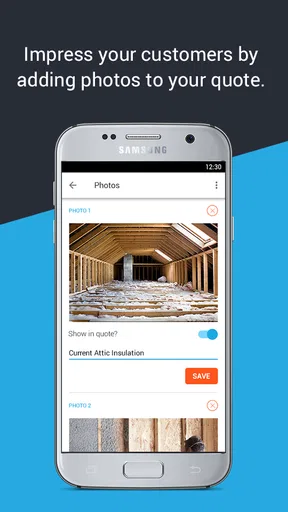
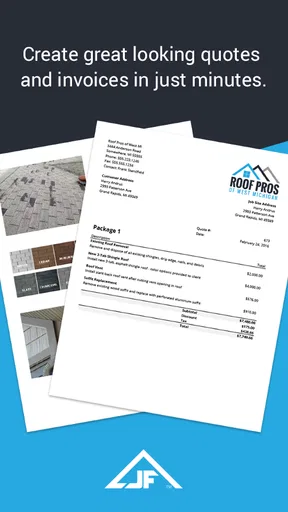

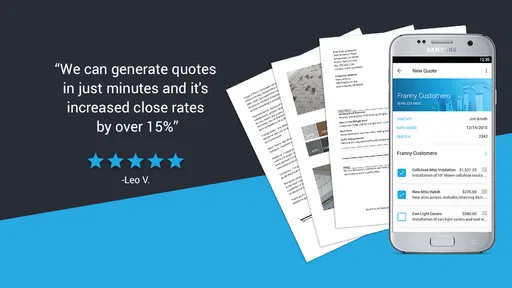
 Analysis by AppCompare
I’d judge a mobile invoicing app by what happens when I’m away from my desk: can I prepare a clear estimate after a site visit, keep client details straight, and avoid promising that a document has gone through when my connection is patchy? That practical angle matters with Invoice Maker & Estimating App, a business app from JobFLEX aimed at contractors and small businesses. I see its strongest appeal in handling routine quotes and invoices on the move, while its usefulness depends on how comfortably its workflow fits your own jobs and connectivity.
Where a connection becomes part of the workflow
Network access matters most at the moments when a document leaves your hands: sharing an estimate, sending an invoice, or relying on a status change to tell you what happened next. The published feature set describes alerts for opened or paid invoices and reminders, but those are inherently tied to communication with clients and the service. I would treat them as helpful prompts, not as a substitute for checking that an important document was actually delivered or that a payment arrived.
That distinction is useful for anyone who works in basements, rural areas, busy job sites, or buildings with unreliable reception. I’d prepare the client and line items when I have a stable connection, then allow a moment to confirm the result after sending. If I’m standing with a customer and need to agree a price immediately, I’d keep the figures visible and avoid assuming that a slow response means the estimate failed—or succeeded. A quick follow-up check can prevent duplicate documents and awkward confusion.
Designed for the gaps between appointments
The app’s mobile focus makes the most sense in short working windows: between jobs, while a client is reviewing a quote, or at the end of a day when paper notes need turning into a proper invoice. A contractor can use that time to record the agreed work while the details are fresh, rather than reconstructing labor and materials from memory later. The advantage is less about replacing a full office system and more about bringing basic paperwork closer to the work itself.
For a small operation, the estimate-to-invoice path is especially practical. I’d use the estimate to make the scope and price understandable before work begins, then carry the agreed information forward when the customer approves. That creates a cleaner record of what was proposed versus what is being billed. It also makes it easier to catch a changed scope: if extra work is added, I’d make that difference explicit instead of quietly rolling it into the final amount.
When something is delayed, use a careful routine
My main caution is that a mobile workflow can make people expect every action to be instant. The earlier experience with this app included occasional delays when syncing between devices. That’s a manageable inconvenience for ordinary admin, but it matters more when two people are editing records or when you need the latest version in front of a client. I’d avoid making parallel edits on different devices until the current copy has had time to catch up.
If a send or sync seems slow, I’d first check the connection and the app’s current status before tapping the same action repeatedly. Repeating a send without checking can leave you unsure whether the customer has one copy or several. For time-sensitive work, keeping a simple note of the client, job, and promised next step gives you a way to recover gracefully if you need to finish the paperwork later. That is not a replacement for a dependable system, but it is a sensible habit for any phone-based business tool.
Worth Reading Before You Choose

EA SPORTS FC Mobile 26 Is a Bigger Football Game, but It Takes Time

Flipboard Shows What News Apps Must Do Beyond the Feed

Switching to Android Auto Means Rethinking Your Driving Routine

Google Calendar Makes a Crowded Week Easier to Manage

Ludo King Makes the Most of the Minutes Between Plans

Baby Panda World Brings Quick Play to Modern Phones, but Its Game Library Feels Busy
Keep client and job information purposeful
Because estimates and invoices contain business details, I’d enter only what I need to identify the customer and describe the work clearly. A concise item description, a meaningful project reference, and a checked total are more useful than stuffing every note into the document. Before sending, I’d review the recipient and the scope line by line; a polished template cannot correct a wrong email address or an ambiguous description.
There is also a trade-off between convenience and relying on one device. A phone is handy at a customer’s property, but a small screen makes longer descriptions and tax settings easier to overlook. I’d reserve a quiet minute for reviewing totals and tax treatment rather than approving a document while walking between tasks. If business records need formal backup, reporting, or a team-wide audit trail, I would compare the app with a more complete accounting system instead of assuming a mobile invoice maker covers those needs.
Those limits don’t make a lightweight app a poor choice; they help define where it fits. It is most appealing when the owner is also the person quoting and billing, the number of active jobs is manageable, and quick documents matter more than complex bookkeeping. A company with multiple staff, intricate approval steps, or extensive financial reporting may find a desktop accounting platform or a broader field-service system more suitable.
As someone who’s juggled multiple freelance gigs, I know firsthand how tricky it can be to keep track of invoicing and estimates. Enter the app, a nifty tool designed to make those nerve-wracking tasks a breeze. Let me walk you through my experience with this app, and why it might just become your new best friend in managing business finances.
Setting Up: A Smooth Ride
First things first, getting started with the Invoice Maker & Estimating App was surprisingly straightforward. After a quick download from the app store, I was up and running in minutes. The user interface is clean, intuitive, and doesn’t overwhelm you with unnecessary features. It’s all about simplicity here, folks!
When I first opened the app, I was greeted with a friendly onboarding process that guided me through setting up my business profile. You can easily input your company details, logo, and even choose your preferred currency and tax settings. I felt like the app was holding my hand, gently guiding me through each step without any hiccups.
Features That Stand Out
One of the highlights of this app is its robust feature set. Whether you’re a freelancer or a small business owner, the app offers something for everyone. Here are some features that really stood out to me:
- Customizable Templates: You can choose from a variety of templates to create invoices and estimates that match your brand. It’s all about making that professional impression!
- Real-Time Notifications: Get alerts when your invoices are opened or paid, keeping you in the loop without having to micromanage.
- Automated Reminders: Forget chasing clients for payments. The app can send polite reminders for you, a feature I found incredibly useful.
- Multi-Currency Support: If you have international clients, you’ll appreciate the ability to invoice in different currencies.
Those tools are most valuable when I use them with a little structure. I’d settle on a consistent way to name jobs and describe recurring services before sending several estimates, so that a returning client can understand each document without comparing a different layout every time. Templates can make an invoice look more professional, but consistency in the wording is what makes it easier to review later.
Currency and tax settings deserve a deliberate check at setup, too. They can save repeated effort once they match the business, but they are not a reason to skip checking each quote. If I take work across regions or bill different types of service, I’d verify the relevant settings before sending a customer a price. The useful trade-off is speed after setup versus the risk of assuming a default suits every job.
Using the App: A Day in the Life
Let me give you a quick peek into how I use the app on a typical day. I start by logging in and checking any pending invoices. The dashboard gives a clear overview of what’s due and what’s outstanding. It’s like having a personal assistant who never forgets!
Creating a new invoice is as easy as pie. You simply select a client, add the services or products, and hit send. The app does the heavy lifting by calculating taxes and totals. I love how it saves me time and reduces the chance of errors.
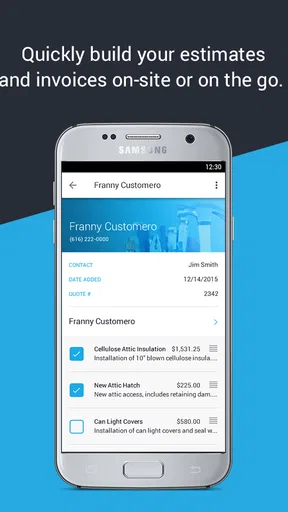
Another aspect I appreciate is the estimation feature. It allows me to draft detailed project quotes which I can easily convert into invoices once the client gives the green light. It streamlines the whole process, making it efficient and hassle-free.
Here’s a realistic use case: after inspecting a leaking kitchen tap, I’d write an estimate with the repair work and any planned parts while the customer and I are still discussing the job. I’d make the description specific enough to distinguish the agreed repair from possible extra work, then send it when I have a reliable connection. If the customer approves, converting that estimate into an invoice keeps the billing tied to the original scope; if the job changes, I’d revise the paperwork so neither side has to guess why the final amount differs.
For a freelancer who completes a few clearly defined projects, that workflow can be enough to replace handwritten quotes and a separate invoice document. It is less compelling for someone who needs detailed inventory, payroll, project-cost analysis, or formal accounting reports. In those cases, I’d use a dedicated accounting or job-management product and treat this app as a focused document tool only if it fits alongside that system.
Readers may also wonder whether it makes sense to start without paying. The app is free to download, while in-app purchases range from $7.99 to $89.99 per item, so I’d first test the basic workflow against a real but low-risk job and check which paid option, if any, is necessary for my routine. I wouldn’t commit based on a feature list alone: the right choice depends on how often I send documents and whether the available workflow handles my actual client process.
Room for Improvement?
While the app is pretty stellar, no app is without its quirks. I found that the customization options, although extensive, could use a bit more flexibility in terms of design elements. A few more color and font options wouldn’t hurt.
Also, while the app is generally reliable, there were a couple of times when the sync with other devices took a bit longer than expected. It’s not a dealbreaker, but something to keep an eye on.
Those points affect different users in different ways. A sole trader who sends straightforward estimates may not care about fine-grained visual control, while a business whose documents are part of a carefully managed brand might want more layout freedom. Likewise, delayed syncing is a minor annoyance if one person handles the paperwork, but a bigger concern when several people need to see a change promptly. I’d decide based on who needs access to the latest information, not just on how quickly I can create a document on my own phone.
There is a broader choice here between a dedicated invoice maker and a conventional spreadsheet or word-processing template. A spreadsheet gives more control over calculations and layout, but it also leaves more room for inconsistent formatting, accidental formula changes, and manual follow-up. This app’s appeal is the guided document workflow and invoice-related reminders; the trade-off is accepting its templates and operating within the app’s approach. For bookkeeping across an entire business, a full accounting package remains the stronger alternative.
It is a business app from JobFLEX, and its audience is clear: people who need estimates and invoices without turning every customer interaction into an office task. Its average rating is 3.4 from around one thousand ratings, with 489 written reviews, so I’d take a moment to consider both the convenience and the rough edges before relying on it for every part of billing. It has reached over 100,000 installs, but popularity alone does not tell me whether its workflow suits a particular trade or billing routine.
The app is free to download and rated for Everyone. It was released on August 9, 2015, and version 8.3.3 is the current version; it supports Android 4.1 and later. Those details make it accessible to a broad range of Android devices, though my decision would still rest on whether the current experience fits my needs and whether I’m comfortable with its purchase options.
Final Thoughts: Is It Worth It?
In conclusion, the app really shines in simplifying the invoicing and estimating process. Its user-friendly design, coupled with powerful features, makes it a fantastic ally for anyone looking to streamline their business operations.
Whether you’re a freelancer or managing a small business, this app can save you a lot of headaches and free up more time for what you do best. So, if you’re on the hunt for a reliable invoicing solution, I’d say give it a shot. It might just become your go-to tool in no time!
My connectivity verdict
I’d recommend trying it if you quote and bill your own work, value a quick mobile process, and can tolerate checking that important sends and syncs have completed. The estimate-to-invoice flow and reminders can make routine administration feel less scattered, especially for a contractor who is moving between customer visits. For a business that depends on uninterrupted access, several staff editing the same records, or extensive financial controls, I’d compare alternatives before making it the central system.
In practice, I’d use it as a convenient way to prepare and follow up on ordinary client paperwork, while keeping a careful eye on connection-dependent actions and the accuracy of each document. That balance is the key: it can make billing easier without removing the need for a sensible review routine. If that matches how you work, it is worth testing; if you need a comprehensive accounting hub, a more fully featured alternative is likely the better fit.
Pros
- User-friendly interface for quick navigation.
- Cloud sync ensures data is always backed up.
- Customizable templates for branding invoices.
- Supports multiple currencies for global use.
- Integrates smoothly with accounting software.
Cons
- Limited free features; subscription required.
- Occasional sync delays with cloud services.
- No offline mode for remote areas.
- Limited customer support on weekends.
- In-app ads can be distracting.
FAQs for Invoice Maker & Estimating App
What features does the Invoice Maker & Estimating App offer?
The Invoice Maker & Estimating App provides a comprehensive set of features, including customizable invoice templates, the ability to create estimates, and options for adding taxes and discounts. Additionally, it supports multiple currencies and languages, integrates with payment gateways, and offers detailed analytics for tracking financial data.
Is the Invoice Maker & Estimating App user-friendly for beginners?
Yes, the app is designed with an intuitive interface that makes it accessible for users of all experience levels. It offers a simple setup process, easy navigation, and step-by-step guides. The app also includes customer support and tutorials to help new users understand and utilize all its features effectively.
Can I use the Invoice Maker & Estimating App offline?
The app offers limited offline functionality, allowing users to create and preview invoices without an internet connection. However, syncing data, sending invoices, and accessing real-time analytics require an internet connection. Once reconnected, all offline actions will automatically synchronize with the cloud.
What types of businesses benefit the most from this app?
Freelancers, small business owners, and service providers will find the Invoice Maker & Estimating App particularly beneficial. It simplifies financial management and helps maintain professionalism by providing tools for accurate and efficient invoicing and estimating, tailored to various industries like construction, consulting, and creative services.
Is customer support available if I encounter issues with the app?
Yes, customer support is readily available through multiple channels, including email, chat, and phone. The app also offers a comprehensive FAQ section and user forums to assist with common issues. Premium users may have access to priority support for faster resolution of their queries.


